Showing posts with label jbpm6. Show all posts

2015/08/20

Shift gears with jBPM executor

Since version 6.0 jBPM comes with component called jBPM executor that is responsible for carrying on with background (asynchronous) tasks. It started to be more and more used with release of 6.2 by users and even more with coming 6.3 where number of enhancements are based on that component:

  • async continuation 
  • async throw signals
  • async start process instance
jBPM executor uses by default a polling mechanism with backend data base that stores jobs to be executed. There are couple of reasons to use that mechanism:
  • supported on any runtime environment (application server, servlet container, standalone)
  • allows to decouple requesting the job from executing the job
  • allows configurable retry mechanism of failed jobs
  • provides search API to look through available jobs
  • allows to schedule jobs instead of being executed immediately 
Following is a diagram illustrating a sequence of events that describe default (polling based) mechanism of jBPM executor (credits for creating this diagram go to Chris Shumaker)
Executor runs in sort of event loop manner - there is one or more threads that constantly (on defined intervals) poll the data base to see if there are any jobs to be executed. If so picks it and delegates for execution. The delegation differs between runtime environments:
  • environment that supports EJB - it will delegate to ejb asynchronous method for execution
  • environment that does not support EJB will execute the job in the same thread that polls db
This in turn drives the configuration options that look pretty much like this:
  • in EJB environment usually single thread is enough as it is used only for triggering the poll and not actually doing the poll, so number of threads should be kept to minimum and the interval should be used to fine tune the speed of processing of async jobs
  • on non EJB environment number of threads should be increased to improve processing power as each thread will be actually doing the work
In both cases users must take into account the actual needs for execution as the more threads/more frequent polls will cause higher load on underlying data base (regardless if there are jobs to execute or not). So keep that in mind when fine tuning the executor settings.

So while this fits certain set of use cases it does not scale well for systems that require high throughput in distributed environment. Huge number of jobs to be executed as soon as possible requires more robust solution to actually cope with the load in reasonable time and with not too heavy load on underlaying data base. 
This came us to enhancement that allows much faster (and immediate compared to polling) execution, and yet still provide same capabilities as the polling:
  • jobs are searchable 
  • jobs can be retried
  • jobs can be scheduled
The solution chosen for this is based on JMS destination that will receive triggers to perform the operations. That eliminates to poll for available jobs as the JMS provider will invoke the executor to process the job. Even better thing is that the JMS message carries only the job request id so the executor will fetch the job from db by id - the most efficient retrieval method instead of running query by date.
JMS allows clustering support and fine tuning of JMS receiver sessions to improve concurrency. All in standard JEE way. 
Executor discovers JMS support and if available will use it (all supported application servers) or fall back to default polling mechanism.

NOTE: JMS is only supported for immediate job requests and not the scheduled one

Polling mechanism is still there as it's responsibility is still significant:
  • deals with retries
  • deals with scheduled jobs
Although need for the high throughput on polling is removed. That means that users when using JMS should consider to change the interval of polls to higher number like every minute instead of every 3 seconds. That will reduce the load on db but still provide very performant execution environment.

Next article will illustrate the performance improvements when using the JMS based executor compared with default polling based. Stay tuned and comments as usually are more than welcome.

2015/04/24

Asynchronous continuation in jBPM 6.3

It's been a while since release of 6.2.0.Final but jBPM is not staying idle, quite the opposite lots of changes are coming in. To give a quick heads up on a feature that has been requested many times - asynchronous continuation.

So what is that? Asynchronous continuation is all about allowing process designers to decide what activities should be executed asynchronously without any additional work required. Some might have already be familiar with async work item handlers that require commands to be given that will be carrying the actual work. While this is very powerful feature it requires additional coding - wrapping business logic in a command. Another drawback is flexibility - one could not easily change if work shall be executed synchronously on asynchronously.

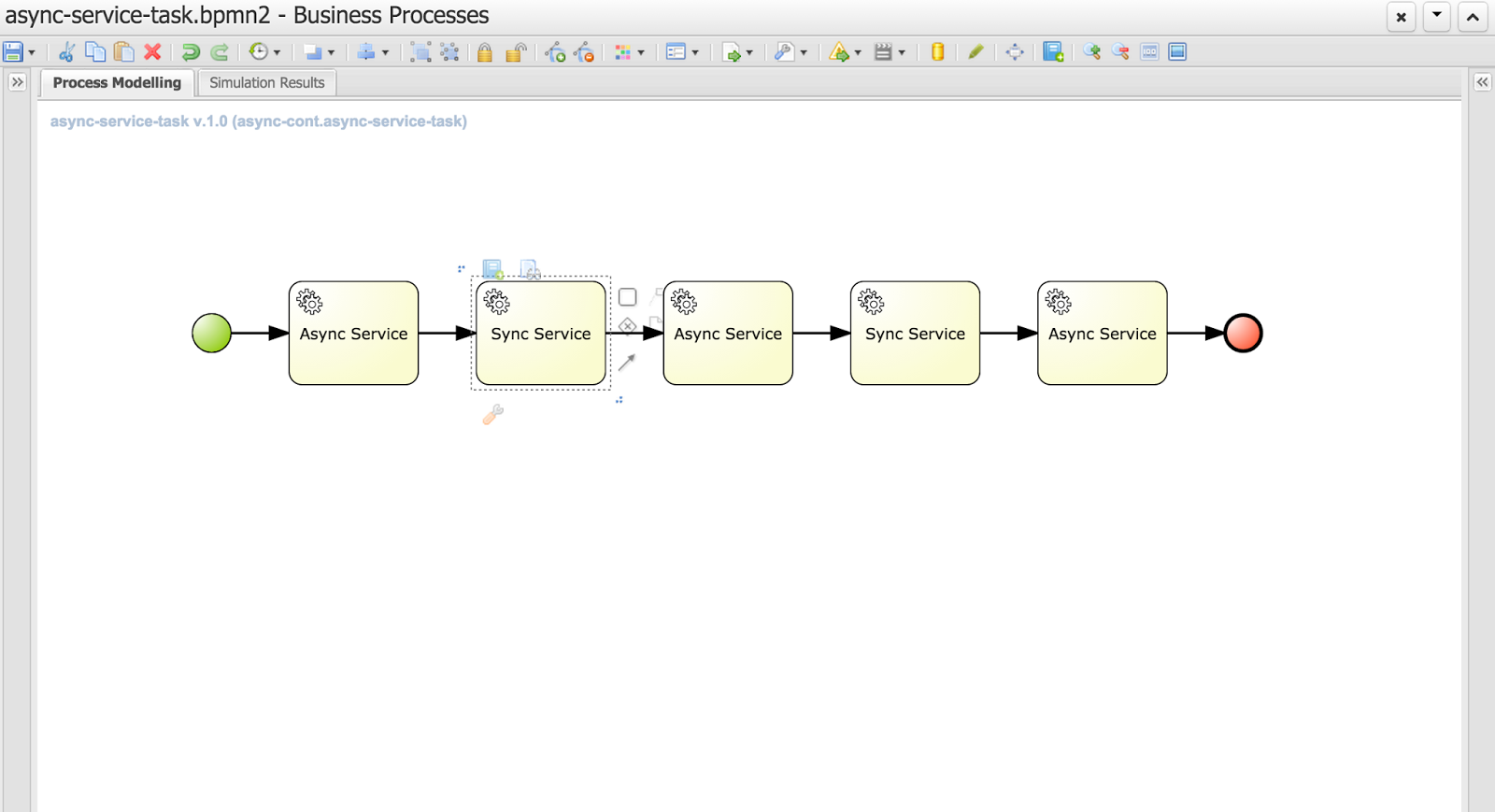
Nevertheless let's take a look at the evolution of that concept to allow users decide themselves what and when should be executed in the background. Let's take a quick look at simple process that is composed of service tasks

You can notice that this process has two types of tasks (look at their names):

  • Async service
  • Sync service
As you can imagine async service will be executed in background while Sync service will be executed on the same thread that its preceding node - so if the preceding node is async node sync node with directly follow it within same thread. 

That's all clear and simple but then how do users define if the service task is async or sync? That's again simple - it's enough to define a dataInput on a task named 'async'
That is the key information to the engine with will inform it how to deal with given node.
Above is the configuration of an Async Service with defined 'async' data input. Next image shows the same configuration but for Sync Service
There is no 'async' dataInput defined.

Here is where I would like to ask for feedback if that way of defining async behavior of a node is sufficient? There is no general BPMN2 property for that behavior and extending BPMN2 xml with custom tags/attributes is not too good in my opinion. 
We could simplify that on editor level where user could simply use checkbox which would define dataInput for the user. All comments are welcome :)

So what will happen if we run this process?


// first async service followed directly by sync service (same thread id)
16:42:26,973 INFO (EJB default - 7) EJB default - 7 Service invoked with name john
16:42:26,977 INFO (EJB default - 7) EJB default - 7 Service invoked with name john

// first async service followed directly by sync service (same thread id)
16:42:29,958 INFO (EJB default - 9) EJB default - 9 Service invoked with name john
16:42:29,962 INFO (EJB default - 9) EJB default - 9 Service invoked with name john

// last async service
16:42:32,954 INFO (EJB default - 1) EJB default - 1 Service invoked with name john


If you look at the timestamps you will see that they match the default settings of jBPM executor - one async thread running every 3 seconds. These are of course configurable so you can fine tune it according to your requirements.

Each process instance of this process will be divided into three steps
Even though Service Tasks are synchronous by nature in BPMN2 with just single setting we can make them execute in background without any coding. 

Moreover, those of you who are already familiar with how jBPM works internally might noticed that these blue boxes actually represents transaction boundaries as well (well, not entirely as start and end node are part of transaction too). So with this we explored another advantage of this feature - possibility to easily define transaction scopes - meaning what nodes should be executed in single transaction. I believe that is another very important feature requested by many jBPM users.

Last but not least bit of technical details. This feature is backed by jBPM executor which is the backbone of asynchronous processing in jBPM 6. That means you need to have executor configured and running to be able to take advantage of this feature. 
If you run on jBPM console (aka kie workbench) there is no need to do anything, you're already fully equipped to do async continuation for all your process.
When you use jBPM in embedded mode there will be some additional steps required that depends on how you utilize jBPM API.
  1. Direct use of KIE API (KieBase and KieSession) - here you need to configure ExecutorService and add it to kieSession environment under "ExecutorService" key. Once it's there it will process the nodes async way
  2. RuntimeManager API - similar to KIE API though you should add ExecutorService as one of environment entires when setting up RuntimeEnvironment
  3. jBPM services API - you need to add ExecutorService as attribute of DepoymentService, if you use CDI or EJB that will be injected automatically for you (assuming all dependencies are available to the container)
This feature is available for:
  • all task types (service, send, receive, business rule, script, user task)
  • subprocesses (embedded and reusable)
  • multi instance task and subprocess

But what happens if user mark node as async but there is no ExecutorService available? Process will still run but will report warning in the log and proceed with nodes as synchronous execution. So it's safe to model your process definition in async way even if there is no async behavior available (yet)

Eclipse use

For those using eclipse modeler instead of web designer: In the new BPMN2 editor (1.2.2), there is a new element under general tab for all tasks, called Metadata. All that needs to be done is add an entry named customAsync and value = true. This will mark the task as asynchronous.

Hope you will like this feature and don't hesitate to leave some comments with feedback and ideas! 

P.S.
This feature is currently on jBPM master and scheduled to go out with 6.3, so if you would like to try it take the latest nightly build or build jBPM from source.

More to come with jBPM so stay tuned...

2015/01/23

MultiInstance Characteristic example - Reward Process

One of a great features of BPMN (and not only) is the multi instance activity aka for each. To put it simple same activity is repeated for each item from input collection. That is usually good fit for distributing work across number of people to gather their input or opinion.
jBPM provides support for it since version 5 but it was enhanced with every version. Current support covers:

  • subprocess and individual task
  • input and output as collection
  • completion condition on entire multi instance activity (subprocess or task)

Equipped with that we can build powerful processes with simplified structure. Even more than that: it's all dynamic meaning number of instances can (and actually should as best practice) reference process variables for both input and output.

To show it in practice we go over an example that is based on Eric Shabell's Reward demo. It has been only slightly modified to focus mainly on the multi instance support jBPM comes with in version 6.2 community. 

So what we have in this process?
  1. When process start it will ask for some details about the person who shall receive award and its details
  2. Once instance is started it will go into 'Associate Reviews' user task where associate needs to provide following information:
    1. how many peer reviews should be performed
    2. how many of them are required to move on without waiting for all to be completed
  3. Once this information is available 'Setup Reviews' task will prepare all required structures and populate process variables that will feed multi instance subprocess
  4. 'Evaluate Award' task will be created multiple times based on (2.1) selection
  5. Each instance of that user task will ask for approval and result of it will be kept in multi instance output collection
  6. It has a completion condition that will evaluate result every time one instance of 'Evaluate Award' task is completed as soon as it becomes true it will move on and cancel remaining task instances of 'Evaluate Award'
  7. 'Calculate results' will be performed to check what output is collected - if award is approved or rejected and based on that will go to one of the paths.
So let's review process configuration in details, starting with process variables


This in general is nothing special, just worth noting two variables:
  • reviews_collection
  • reviews_results
both are of type java.util.ArrayList (they can be of any collection type) and they will be used for configuring multi instance subprocess. Important to note is that both must be non null before they can be used in multi instance activity.

Next let's review how the multi instance activity is configured:

MI collection input - this is the collection which will be used to create individual instances of given activity. In other words, each element from that collection will be assigned to separate activity instance.
MI collection output - this is the collection which will collect results of execution of multi instance activity - will aggregate all results produced. This is optional as not every multi instance activity must produce result that shall be collected.
MI completion condition - expression (currently MVEL) that will be evaluated at every completion of activity instance and as soon as it becomes true it will leave multi instance activity even if not all instances are completed. Those not completed will be canceled.
MI data input - this is the variable name that will be given to individual activity instances produced by multi instance activity. 
MI data output - this is the variable name where the output of individual activity instance will be stored. It's optional as not all activities must produce results


Last but not least let's take a look in details at the completion condition as it provide quite powerful way of controlling multi instance activity completion.

In case it won't be readable (or for copy paste reason) here is the expression:

($ in reviews_results if $ == true).size() == approvalsRequired;

so what does it say? In general it evaluates all items in the 'reviews_results' collection and counts all elements that has value set to 'true'. Next it compares its size with the 'approvalsRequired' process variable to check if already collected approvals is enough.

For those interested, this is MVEL projections example which gives very powerful option to operate on collections.

That would be all to this article. For complete runnable example visit github. You can directly clone it from your kie-workbench installation (aka jbpm console) and run it there. It comes with all required parts:
  • process
  • forms
  • data model
All configured and ready to be executed (just make sure you run on jBPM 6.2 or higher). Enjoy

As usual comments and feedback most welcome.

2015/01/07

jBPM talk and workshop at DevConf 2015

I am happy to announce that a talk and workshop about jBPM 6 has been accepted at DevConf 2015 in Brno.

Talk: jBPM - BPM Swiss knife

During the presentation jBPM will be introduced from the Process Engine & framework perspective.The main goal of the session is to share with the community of developers how they can improve their systems implementations and integrations by using a high level, business oriented methodology that will help to improve the performance of the company. jBPM will help to keep the infrastructural code organized and decoupled from the business knowledge. During the presentation the new APIs and new modules in jBPM version 6 will be introduced for the audience to have a clear spectrum of the tools provided.

Speaker: Maciej Swiderski

Workshop: Get your hands dirty with jBPM 

This is continuation of the presentation of jBPM (jBPM - BPM swiss knife) that introduces to jBPM while this is mainly focused on making use of that knowledge in real cases. On this workshop users will be able to see in action jBPM from both perspectives:
  • as a services when jBPM is used as BPM platform
  • as embedded when jBPM is used as a framework in custom applications
This workshop is intended to give a quick start with jBPM and help users to decide which approach is most suitable for their needs.

Speakers:
Jiri Svitak
Maciej Swiderski
Radovan Synek

Schedule for the complete conference can be found here. See you there!!!

2014/11/28

Process instance migration made easy

jBPM 6 comes with an excellent deployment model based on knowledge archives which allows different versions of given project to run in parallel in single execution environment. That is very powerful but at the same time brings some concerns about how to deal with them, to name few:

  • shall users run both old and new version of the processes?
  • what shall happen to already active process instances started with previous version?
  • can active versions be migrated to newer version and vice versa?

While there might be other concerns, one of the most frequently asked question is such situation is: can I migrate active process instance?

So can we do process migration with jBPM?

The straight answer is - YES

... but it was not easily available to be performed via jbpm console (aka kie-workbench). This article is about to introduce solution to this limitation by providing ... knowledge archive that can be deployed to your installation and simply used to migrate any process instance. I explicitly use term "migrate" instead of upgrade because it can actually be used in both directions (from lower to higher version or from higher to lower version).

So there are quite few things that might happen when such operation is performed. All depends on the changes between versions of the process definition that are part of the migration. So what does this process migration comes with:

  • it can migrate from one process to another within same kjar
  • it can migrate from on process to another across kjars
  • it can migrate with node mapping between process versions 

While the first two options are simple, the third one might require some explanation. What is node mapping? While doing changes in process versions we might end up in situation that nodes/activities are replaced with another node/activity and by that when migrating between these versions mapping needs to take place. Another aspect is when you would like to skip some nodes in current version (see second example).

NOTE: mapping will happen only for active nodes of the process instance that is being migrated.

Be careful what you migrate...

Migration does not affect any data so please take that into account when performing migration as in case there were changes on data level process instance migration will not be able to resolve potential conflicts and that might lead to problems after migration.

To give you some heads up about how does it work, here comes two screencasts that showcase its capabilities in actions. For this purpose we use our standard Evaluation process that is upgraded with new version and active process instance is migrated to next version.

Simple migration of process instance

This case is about showing how simple it can be to migrate active process instance from one version to another:
  • default org.jbpm:Evaluation:1.0 project is used which consists of single process definition - evaluation with version 1
  • single process instance is started with this version
  • after it has been started, new version of evaluation process is created
  • upgraded version is then released as part of org.jbpm:Evaluation:2.0 project with process version 2
  • then migration of the active process instance is performed
  • results of the process instance migration is the illustrated on process model of active instance and as outcome of the process instance migration

Process instance migration with node mapping

In this case, we go one step further and add another node to Evaluation process (version 2) to skip one of the nodes from original version. So to do that, we need to map nodes to be migrated. Steps here are almost the same as in first case with the difference that we need to go over additional steps to collect node information and then take manual decision (over user task) what nodes are mapped to new version. Same feedback is given about results.


Ready to give it a go?

To play with it, make sure you have jBPM version 6.2 (currently available at CR level from maven repository but soon final release will be available) and then grab this repository into your jbpm console (kie-wb) workspace - just clone it directly in kie-wb. Once it's cloned simply build and deploy and you're ready to migrate any process instance :).

Feedback, issues, ideas for improvements and last but not least contribution is more than welcome.

2014/11/21

Cross framework services in jBPM 6.2

jBPM version 6 comes with quite a few improvements that allow developers build their own systems with BPM and BRM capabilities just to name few:
  • jar based deployment units - kjar
  • deployment descriptors for kjars
  • runtime manager with predefined runtime strategies
  • runtime engine with configured components
    • KieSession
    • TaskService
    • AuditService (whenever persistence is used)
While these are certainly bringing lots of improvements in embedability of jBPM into custom application they do come with some challenges in terms of how they can be consumed. Several pieces need to come along to have it properly supported and reliably running:
  • favor use of RuntimeManager and RuntimeEngine whenever performing work instead of using cached ksession and task service instance
  • Cache only RuntimeManager not RuntimeEngine or runtime engine's components
  • Creating runtime manger requires configuration of various components via runtime environment - way more simplified compared to version 5 but still...
  • On request basis always get new RuntimeEngine with valid context, work with ksession, task service and then dispose runtime engine
All these (and more) were sometimes forgotten or assumed will be done automatically while they weren't. And even more issues could arise when working with different frameworks - CDI, ejb, spring, etc.

Rise of jBPM services (redesigned in version 6.2)

Those who are familiar with jBPM console (aka kie workbench) code base might already be aware of some services that were present from version 6.0 and through 6.1. Module that encapsulated these services is jbpm-kie-services. This module was purely written with CDI in mind and all services within it were CDI based. There was additional code to ease consumption of them without CDI but that did not work well - mainly because as soon as the code was running in CDI container (JEE6 application servers) CDI got into the way and usually caused issues due to unsatisfied dependencies.

So that (obviously not only that :)) brought us to a highly motivated decision - to revisit the design of these services to allow more developer friendly implementation that can be consumed regardless of what framework one is using.

So with the design we came up with following structure:
  • jbpm-services-api - contains only api classes and interfaces
  • jbpm-kie-services - rewritten code implementation of services api - pure java, no framework dependencies
  • jbpm-services-cdi - CDI wrapper on top of core services implementation
  • jbpm-services-ejb-api - extension to services api for ejb needs
  • jbpm-services-ejb-impl - EJB wrappers on top of core services implementation
  • jbpm-services-ejb-client - EJB remote client implementation - currently only for JBoss
Service modules are grouped with its framework dependencies, so developers are free to choose which one is suitable for them and use only that. No more issues with CDI if I don't want to use CDI :)

Let's now move into the services world and see what we have there and how they can be used. First of all they are grouped by their capabilities:

DeploymentService

As the name suggest, its primary responsibility is to deploy (and undeploy) units. Deployment unit is kjar that brings in business assets (like processes, rules, forms, data model) for execution. Deployment services allow to query it to get hold of available deployment units and even their RuntimeManager instances.

NOTE: there are some restrictions on EJB remote client to do not expose RuntimeManager as it won't make any sense on client side (after it was serialized).

So typical use case for this service is to provide dynamic behavior into your system so multiple kjars can be active at the same time and be executed simultaneously.
// create deployment unit by giving GAV
DeploymentUnit deploymentUnit = new KModuleDeploymentUnit(GROUP_ID, ARTIFACT_ID, VERSION);
// deploy        
deploymentService.deploy(deploymentUnit);
// retrieve deployed unit        
DeployedUnit deployed = deploymentService.getDeployedUnit(deploymentUnit.getIdentifier());
// get runtime manager
RuntimeManager manager = deployed.getRuntimeManager();

Deployment service interface and its methods can be found here.

DefinitionService

Upon deployment, every process definition is scanned using definition service that parses the process and extracts valuable information out of it. These information can provide valuable input to the system to inform users about what is expected. Definition service provides information about:
  • process definition - id, name, description
  • process variables - name and type
  • reusable subprocesses used in the process (if any)
  • service tasks (domain specific activities)
  • user tasks including assignment information
  • task data input and output information
So definition service can be seen as sort of supporting service that provides quite a few information about process definition that are extracted directly from BPMN2.

String processId = "org.jbpm.writedocument";
        
Collection<UserTaskDefinition> processTasks = 
bpmn2Service.getTasksDefinitions(deploymentUnit.getIdentifier(), processId);
        
Map<String, String> processData = 
bpmn2Service.getProcessVariables(deploymentUnit.getIdentifier(), processId);
        
Map<String, String> taskInputMappings = 
bpmn2Service.getTaskInputMappings(deploymentUnit.getIdentifier(), processId, "Write a Document" );

While it usually is used with combination of other services (like deployment service) it can be used standalone as well to get details about process definition that do not come from kjar. This can be achieved by using  buildProcessDefinition method of definition service.

Definition service interface can be found here.

ProcessService

Process service is the one that usually is of the most interest. Once the deployment and definition service was already used to feed the system with something that can be executed. Process service provides access to execution environment that allows:

  • start new process instance
  • work with existing one - signal, get details of it, get variables, etc
  • work with work items
At the same time process service is a command executor so it allows to execute commands (essentially on ksession) to extend its capabilities.
Important to note is that process service is focused on runtime operations so use it whenever there is a need to alter (signal, change variables, etc) process instance and not for read operations like show available process instances by looping though given list and invoking getProcessInstance method. For that there is dedicated runtime data service that is described below.

An example on how to deploy and run process can be done as follows:
KModuleDeploymentUnit deploymentUnit = new KModuleDeploymentUnit(GROUP_ID, ARTIFACT_ID, VERSION);
        
deploymentService.deploy(deploymentUnit);

long processInstanceId = processService.startProcess(deploymentUnit.getIdentifier(), "customtask");
     
ProcessInstance pi = processService.getProcessInstance(processInstanceId);     

As you can see start process expects deploymentId as first argument. This is extremely powerful to enable service to easily work with various deployments, even with same processes but coming from different versions - kjar versions.

Process service interface can be found here.

RuntimeDataService

Runtime data service as name suggests, deals with all that refers to runtime information:

  • started process instances
  • executed node instances
  • available user tasks 
  • and more
Use this service as main source of information whenever building list based UI - to show process definitions, process instances, tasks for given user, etc. This service was designed to be as efficient as possible and still provide all required information.

Some examples:
1. get all process definitions
Collection definitions = runtimeDataService.getProcesses(new QueryContext());


2. get active process instances

Collection instances = runtimeDataService.getProcessInstances(new QueryContext());
3. get active nodes for given process instance

Collection instances = runtimeDataService.getProcessInstanceHistoryActive(processInstanceId, new QueryContext());
4. get tasks assigned to john

List taskSummaries = runtimeDataService.getTasksAssignedAsPotentialOwner("john", new QueryFilter(0, 10));

There are two important arguments that the runtime data service operations supports:

  • QueryContext
  • QueryFilter - extension of QueryContext
These provide capabilities for efficient management result set like pagination, sorting and ordering (QueryContext). Moreover additional filtering can be applied to task queries to provide more advanced capabilities when searching for user tasks.

Runtime data service interface can be found here.

UserTaskService

User task service covers complete life cycle of individual task so it can be managed from start to end. It explicitly eliminates queries from it to provide scoped execution and moves all query operations into runtime data service.
Besides lifecycle operations user task service allows:
  • modification of selected properties
  • access to task variables
  • access to task attachments
  • access to task comments
On top of that user task service is a command executor as well that allows to execute custom task commands.

Complete example with start process and complete user task done by services:
  
long processInstanceId = 
processService.startProcess(deployUnit.getIdentifier(), "org.jbpm.writedocument");

List<Long> taskIds = 
runtimeDataService.getTasksByProcessInstanceId(processInstanceId);

Long taskId = taskIds.get(0);
     
userTaskService.start(taskId, "john");
UserTaskInstanceDesc task = runtimeDataService.getTaskById(taskId);
     
Map<String, Object> results = new HashMap<String, Object>();
results.put("Result", "some document data");
userTaskService.complete(taskId, "john", results);

That concludes quick run through services that jBPM 6.2 will provide. Although there is one important information left to be mentioned. Article name says it's cross framework services ... so let's see various in action:

  • CDI - services with CDI wrappers are heavily used (and by that tested) in jbpm console - kie-wb. Entire execution server that comes in jbpm console is utilizing jbpm services over its CDI wrapper.
  • Ejb - jBPM provides a sample ejb based execution server (currently without UI) that can be downloaded and deployed to JBoss - it was tested with JBoss but might work on other containers too - it's built with jbpm-services-ejb-impl module
  • Spring - a sample application has been developed to illustrate how to use jbpm services in spring based application

The most important thing when working with services is that there is no more need to create your own implementations of Process service that simply wraps runtime manager, runtime engine, ksession usage. That is already there. It can be nicely seen in the sample spring application that can be found here. And actually you can try to use that as well on OpenShift Online instance here.
Go to application on Openshift Online
 Just logon with:

  • john/john1
  • mary/mary1
If there is no deployments available deploy one by specifying following string:
org.jbpm:HR:1.0
this is the only jar available on that instance.

And you'll be able to see it running. If you would like to play around with it on you own, just clone the github repo build it and deploy it. It runs out of the box on JBoss EAP 6. For tomcat and wildfly deployments see readme file in github.

That concludes this article and as usual comments and ideas for improvements are more than welcome.

As a side note, all these various framework applications built on top of jBPM services can simply work together without additional configuration just by configuring to be backed by the same data base. That means:
  • deployments performed on any of the application will be available to all applications automatically
  • all process instances and tasks can be seen and worked on via every application
that provides us with truly cross framework integration with guarantee that they all work in the same way - consistency is the most important when dealing with BPM :)


2014/02/06

jBPM 6 - store your process variables anywhere

Most of jBPM users is aware of how jBPM stores process variable but let's recap it here again just for completeness.

NOTE: this article covers jBPM that uses persistence as without persistence process variables are kept in memory only.

 jBPM puts single requirement on the objects that are used as process variables:
  • object must be serializable (simply must implement java.io.Serializable interface)
with that jBPM engine is capable to store all process variables as part of process instance using marshaling mechanism that is backed by Google Protocol Buffers. That means actual instances are marshaled into bytes and stored in data base. This is not always desired especially in case of objects that are actually not owned by the process instance. For example:
  • JPA entities of another system
  • documents stored in document/content management system 
  • etc
Luckily, jBPM has a solution to that as well called pluggable Variable Persistence Strategy. Out of the box jBPM provides two strategies:
  • serialization based, mentioned above that actually works on all object types as long as they are serializable (org.drools.core.marshalling.impl.SerializablePlaceholderResolverStrategy)
  • JPA based that works on objects that are entities (org.drools.persistence.jpa.marshaller.JPAPlaceholderResolverStrategy)
Let's spend some time on the JPA based strategy as it might become rather useful in many cases where jBPM is used in embedded mode. Consider following scenario where our business process uses entities as process variables. The same entities might be altered from outside of the process and we would like to keep them up to date within the process as well. To do so, we need to use JPA based strategy for variable persistence that is capable of storing entities in data base and then retrieving them back.
To configure variable persistence strategy you need to place it into the environment that is the used when creating knowledge sessions. Note that the order of the strategies is important as they will be evaluated which one will be used in the order they are given. best practice is to always set the serialization based strategy to be the last one. 
An example how you can use it with RuntimeManager:


// create entity manager factory
EntityManagerFactory emf = Persistence.createEntityManagerFactory("org.jbpm.sample");

RuntimeEnvironment environment = 
     RuntimeEnvironmentBuilder.Factory.get().newDefaultBuilder()
     .entityManagerFactory(emf) 
     .addEnvironmentEntry(EnvironmentName.OBJECT_MARSHALLING_STRATEGIES, 
          new ObjectMarshallingStrategy[]{
// set the entity manager factory for jpa strategy so it 
// know how to store and read entities     
               new JPAPlaceholderResolverStrategy(emf),
// set the serialization based strategy as last one to
// deal with non entities classes
               new SerializablePlaceholderResolverStrategy( 
                          ClassObjectMarshallingStrategyAcceptor.DEFAULT  )
         })  
     .addAsset(ResourceFactory.newClassPathResource("cmis-store.bpmn"), 
               ResourceType.BPMN2)
     .get();
// create the runtime manager and start using entities as part of your process  RuntimeManager manager = 
     RuntimeManagerFactory.Factory.get().newSingletonRuntimeManager(environment);

Once we know how to configure it, let's take some time to understand how it actually works. First of all, every process variable on the time when it's going to be persisted will be evaluated on the strategy and it's up to the strategy to accept or reject given variable, if accepted only that strategy will be used to persist the variable, if rejected other strategies will be consulted.

Note: make sure that you add your entity classes into persistence.xml that will be used by the jpa strategy

JPA will accept only classes that declares a field with @Id annotation (javax.persistence.Id) that allows us to ensure we will have an unique id to be used when retrieving the variable.
Serialization based one simply accepts all variables by default and thus it should be the last strategy inline. Although this default behavior can be altered by providing other acceptor implementation.

Once the strategy accepts the variable it performs marshaling operation to store the variable and unmarshaling to retrieve the variable from the back end store (of the type it supports).

In case of JPA, marshaling will check if entity is already stored entity - has id set - and:

  • if not, it will persist the entity using entity manager factory that was assigned to it
  • if yes, it will merge it with the persistence context to make sure up to date information is stored
when unmarshaling it will use the unique id of the entity to load it from the database and provide as process variable. It's that simple :)

With that, we quickly covered the default (serialization based) strategy and JPA based strategy. But the title of this article says we can store variables anywhere, so how's that possible?
It's possible because of the nature of variable persistence strategies - they are pluggable. We can create our own and simply add it to the environment and process variables that meets the acceptance criteria of the strategy will be persisted by that given strategy. To not leave you with empty hands let's look at another implementation I created for purpose of this article (although when working on it I believe it will become more than just example for this article).

Implementing variable persistence strategy is actually very simple, it's a matter of implementing single interface: org.kie.api.marshalling.ObjectMarshallingStrategy

public interface ObjectMarshallingStrategy {
    
    public boolean accept(Object object);

    public void write(ObjectOutputStream os,
                      Object object) throws IOException;
    
    public Object read(ObjectInputStream os) throws IOException, ClassNotFoundException;
    

    public byte[] marshal( Context context,
                           ObjectOutputStream os,
                           Object object ) throws IOException;
    
    public Object unmarshal( Context context,
                             ObjectInputStream is,
                             byte[] object,
                             ClassLoader classloader ) throws IOException, ClassNotFoundException;

    public Context createContext();
}

the most important methods for us are:

  • accept - decides if this strategy will be responsible for persistence of given object
  • marshal - performs operation to store process variable
  • unmarshal - performs operation to retrieve process variable
the other remaining are for backward compatibility reasons with old marshaling framework prior to protobuf, so it's not mandatory to be implemented but it's worth to put the logic there too as most likely it will be same as for marshal (write) and unmarshal (read).

So the mentioned example implementation is for storing and retrieving process variables as document from Content/Document management systems that support access to the repository using CMIS. I used Apache Chemistry as the integration component that can easily talk to CMIS enabled systems like for example Alfresco.


So first bit of requirements:

  • process variables must be of certain type to be stored in the content repository
  • documents (process variables stored in cms) can be:
    • created
    • updated (with versioning)
    • read
  • process variables must be kept up to date
so all these sounds simple and of course that's the point to keep it simple at this point. CMS can be used for much more but we wanted to get started and then enhance it if needed. So the implementation of strategy org.jbpm.integration.cmis.impl.OpenCMISPlaceholderResolverStrategy supports following:
  • when marshaling
    • create new documents if it does not have object id assigned yet
    • update document if it has already object id assigned
      • by overriding existing content
      • by creating new major version of the document 
      • by creating new minor version of the document
  • when unmarshaling
    • load the content of the document based on given object id
So you can actually use this strategy for:
  • creating new documents from the process based on custom content
  • update existing documents with custom content
  • load existing documents into process variable based on object id only
These are very high level details but let's look at the actual code that does that "magic", let's start with marshal logic - note that is bit simplified for readability here and complete code can be found in github.


public byte[] marshal(Context context, ObjectOutputStream os, Object object) throws IOException {
 Document document = (Document) object;
 // connect to repository
 Session session = getRepositorySession(user, password, url, repository);
 try {
  if (document.getDocumentContent() != null) {
   // no object id yet, let's create the document
   if (document.getObjectId() == null) {
    Folder parent = ... // find folder by path
    if (parent == null) {
     parent = .. // create folder
    }
    // now we are ready to create the document in CMS
   } else {
      // object id exists so time to update     
   }
  }
 // now nee need to store some info as part of the process instance
 // so we can later on look up, in this case is the object id and class
 // that we use as process variable so we can recreate the instance on read
     ByteArrayOutputStream buff = new ByteArrayOutputStream();
     ObjectOutputStream oos = new ObjectOutputStream( buff );
     oos.writeUTF(document.getObjectId());
     oos.writeUTF(object.getClass().getCanonicalName());
     oos.close();
     return buff.toByteArray();
 } finally {
  // let's clear the session in the end
  session.clear();
 }
}

so as you can see, it first deals with the actual storage (in this case CMIS based repository) and then save some small details to be able to recreate the actual object instance on reading. It stores objectId and fully qualified class name of the process variable. And that's it. Process variable of type Document will be stored inside content repository.

Then let's look at the unmarshal method:


public Object unmarshal(Context context, ObjectInputStream ois, byte[] object, ClassLoader classloader) throws IOException, ClassNotFoundException {
 DroolsObjectInputStream is = new DroolsObjectInputStream( new ByteArrayInputStream( object ), classloader );
 // first we read out the object id and class name we stored during marshaling
 String objectId = is.readUTF();
 String canonicalName = is.readUTF();
 // connect to repository
 Session session = getRepositorySession(user, password, url, repository);
 try {
  // get the document from repository and create new instance ot the variable class
  CmisObject doc = .....
  Document document = (Document) Class.forName(canonicalName).newInstance();
  // populate process variable with meta data and content
  document.setObjectId(objectId);
  document.setDocumentName(doc.getName());   
  document.setFolderName(getFolderName(doc.getParents()));
  document.setFolderPath(getPathAsString(doc.getPaths()));
  if (doc.getContentStream() != null) {
   ContentStream stream = doc.getContentStream();
   document.setDocumentContent(IOUtils.toByteArray(stream.getStream()));
   document.setUpdated(false);
   document.setDocumentType(stream.getMimeType());
  }
  return document;
 } catch(Exception e) {
  throw new RuntimeException("Cannot read document from CMIS", e);
 } finally {
  // do some clean up...
  is.close();
  session.clear();
 }
}

nothing more that the logic to get ids and class name so the instance can be recreated and load the document from cms repository and we're done :)

Last but not least, the accept method.


public boolean accept(Object object) {
    if (object instanceof Document) {
 return true;
    }
    return false;
}

and that is all that is needed to actually implement your own variable persistence strategy. The only thing left is to register the strategy on the environment so it will be evaluated when storing/retrieving variables. It's done the same way as described for JPA based on.

Complete source code with some tests showing complete usage case from process can be found here. Enjoy and feel free to provide feedback, maybe it's worth to start producing repository of such strategies so we can have rather rich set of strategies to be used...

2014/01/20

jBPM 6 with spring

As some of you might noticed jBPM got quite few improvements for version 6.0, to just name few:

  • RuntimeManager
  • enhanced timer service
  • new deployment model - based on kjar and maven
  • brand new tooling 
  • see release notes for more
there is (as always) still room for improvements. After 6.0 went out, we started to look at how we could ease the usage of jBPM in Spring based applications on top of the new API. Lots of the API is now based on the concept of fluent API which is not really Spring friendly.
Before we dive into details of the API and how it can be used in Spring let's look at possible usage scenarios that users might be interested in:

  • Self managed process engine
This is the standard (and the simplest) way to get up and running with jBPM in your application. You only configure it once and run as part of the application. With the RuntimeManager usage, both process engine and task service will be managed in complete synchronization, meaning there is no need from end user to deal with "plumbing" code to make these two work together. 
  • Shared task service
There could be a need in certain situations, that a single instance of a TaskService is used. This approach give more flexibility in configuring the task service instance as it's not behind RuntimeManager. Once configured it's then used by the RuntimeManager when requested. RuntimeManager in such situation will not create new instances of task service as it's done with self managed process engine approach.

To provide spring based way of setting up jBPM, few factory beans where added:

org.kie.spring.factorybeans.RuntimeEnvironmentFactoryBean


Factory responsible for producing instances of RuntimeEnvironment that are consumed by RuntimeManager upon creation. It allows to create following types of RuntimeEnvironment (that mainly means what is configured by default):
  • DEFAULT - default (most common) configuration for RuntimeManager
  • EMPTY - completely empty environment to be manually populated
  • DEFAULT_IN_MEMORY - same as DEFAULT but without persistence of the runtime engine
  • DEFAULT_KJAR - same as DEFAULT but knowledge asset are taken from KJAR identified by releaseid or GAV
  • DEFAULT_KJAR_CL - build directly from classpath that consists kmodule.xml descriptor
Mandatory properties depends on the selected type but knowledge information must be given for all types. That means that one of the following must be provided:
  • knowledgeBase
  • assets
  • releaseId
  • groupId, artifactId, version
Next for DEFAULT, DEFAULT_KJAR, DEFAULT_KJAR_CL persistence needs to be configured:
  • entity manager factory
  • transaction manager
Transaction Manager must be Spring transaction manager as based on its presence entire persistence and transaction support is configured.  Optionally EntityManager can be provided to be used instead of always creating new one from EntityManagerFactory - e.g. when using shared entity manager from Spring. All other properties are optional and are meant to override the default given by type of the environment selected.

org.kie.spring.factorybeans.RuntimeManagerFactoryBean

FactoryBean responsible for creation of RuntimeManager instances of given type based on provided runtimeEnvironment. Supported types:
  • SINGLETON
  • PER_REQUEST
  • PER_PROCESS_INSTANCE
where default is SINGLETON when no type is specified.  Every runtime manager must be uniquely identified thus identifier is a mandatory property. All instances created by this factory are cached to be able to properly dispose them using destroy method (close()).

org.kie.spring.factorybeans.TaskServiceFactoryBean

Creates instance of TaskService based on given properties. Following are mandatory properties that must be provided:
  • entity manager factory
  • transaction manager
Transaction Manager must be Spring transaction manager as based on its presence entire persistence and transaction support is configured. Optionally EntityManager can be provided to be used instead of always creating new one from EntityManagerFactory - e.g. when using shared entity manager from Spring. In addition to above there are optional properties that can be set on task service instance:
  • userGroupCallback - implementation of UserGroupCallback to be used, defaults to MVELUserGroupCallbackImpl
  • userInfo - implementation of UserInfo to be used, defaults to DefaultUserInfo
  • listener - list of TaskLifeCycleEventListener that will be notified upon various operations on tasks
This factory creates single instance of task service only as it's intended to be shared across all other beans in the system.


Now we know what components we are going to use, so it's time to look at how we could actually configure our spring application to take advantage on jBPM version 6. We start with the simple self managed approach where we configure single runtime manager with inline resources (processes) added.

1. First we setup entity manager factory and transaction manager:

  <bean id="jbpmEMF" class="org.springframework.orm.jpa.LocalContainerEntityManagerFactoryBean">
    <property name="persistenceUnitName" value="org.jbpm.persistence.spring.jta"/>
  </bean>

  <bean id="btmConfig" factory-method="getConfiguration" class="bitronix.tm.TransactionManagerServices">
  </bean>

  <bean id="BitronixTransactionManager" factory-method="getTransactionManager"
        class="bitronix.tm.TransactionManagerServices" depends-on="btmConfig" destroy-method="shutdown" />
  
  <bean id="jbpmTxManager" class="org.springframework.transaction.jta.JtaTransactionManager">
    <property name="transactionManager" ref="BitronixTransactionManager" />
    <property name="userTransaction" ref="BitronixTransactionManager" />
  </bean>
with this we have ready persistence configuration that gives us:
  • JTA transaction manager (backed by bitronix - for unit tests or servlet containers)
  • entity manager factory for persistence unit named org.jbpm.persistence.spring.jta
2. Next we configure resource that we are going to use - business process

<bean id="process" factory-method="newClassPathResource" class="org.kie.internal.io.ResourceFactory">
  <constructor-arg>
    <value>jbpm/processes/sample.bpmn</value>
  </constructor-arg>
</bean>
this configures single process that will be available for execution - sample.bpmn that will be taken from class path. This is the simplest way to get your processes included when trying out jbpm.

3. Then we configure RuntimeEnvironment with our infrastructure (entity manager, transaction manager, resources)


<bean id="runtimeEnvironment" class="org.kie.spring.factorybeans.RuntimeEnvironmentFactoryBean">
  <property name="type" value="DEFAULT"/>
  <property name="entityManagerFactory" ref="jbpmEMF"/>
  <property name="transactionManager" ref="jbpmTxManager"/>
  <property name="assets">
    <map>
      <entry key-ref="process"><util:constant static-field="org.kie.api.io.ResourceType.BPMN2"/></entry>
    </map>
  </property>
</bean>
that gives us default runtime environment ready to be used to create instance of a RuntimeManager.

4. And finally we create RuntimeManager with the environment we just setup

<bean id="runtimeManager" class="org.kie.spring.factorybeans.RuntimeManagerFactoryBean" destroy-method="close">
  <property name="identifier" value="spring-rm"/>
  <property name="runtimeEnvironment" ref="runtimeEnvironment"/>
</bean>

with just four steps you are ready to execute your processes with Spring and jBPM 6, utilizing EntityManagerFactory and JTA transaction manager.

As an optional step, especially useful when testing you can create AuditLogService to get history information of your process executions.


<bean id="logService" class="org.jbpm.process.audit.JPAAuditLogService">
  <constructor-arg>
    <ref bean="jbpmEMF"/>
  </constructor-arg>
</bean>

Complete spring configuration file can be found here.

This is just one configuration setup that jBPM 6 supports - JTA transaction manager and EntityManagerFactory, others are:
  • JTA and SharedEntityManager
  • Local Persistence Unit and EntityManagerFactory
  • Local Persistence Unit and SharedEntityManager
What is important to note here is that there is no need to setup TaskService at all, some part of it like user group callback, can be configured via RuntimeEnvironment but the whole setup is done automatically by RuntimeManager. No need to worry about that.

Although if you need more control over TaskService instance you can set it up yourself and let RuntimeManager use it instead of creating its own instances.

To do so, you start the same as for self managed process engine case, follow step 1 and 2. Next we configure task service

<bean id="taskService" class="org.kie.spring.factorybeans.TaskServiceFactoryBean" destroy-method="close">
    <property name="entityManagerFactory" ref="jbpmEMF"/>
    <property name="transactionManager" ref="jbpmTxManager"/>
    <property name="listeners">
      <list>
        <bean class="org.jbpm.services.task.audit.JPATaskLifeCycleEventListener" />
      </list>
    </property>
  </bean>
with that we add an extra task life cycle listener to save all task operations as log entires.

Then, step 3 needs to be slightly enhanced to set task service instance in the runtime environment so RuntimeManager can make use of it


<bean id="runtimeEnvironment" class="org.kie.spring.factorybeans.RuntimeEnvironmentFactoryBean">
  <property name="type" value="DEFAULT"/>
  <property name="entityManagerFactory" ref="jbpmEMF"/>
  <property name="transactionManager" ref="jbpmTxManager"/>
  <property name="assets">
    <map>
      <entry key-ref="process"><util:constant static-field="org.kie.api.io.ResourceType.BPMN2"/></entry>
    </map>
   </property>
   <property name="taskService" ref="taskService"/>
 </bean>
that will disable task service creation by RuntimeManager and always use this single shared instance.
Step 4 (creating RuntimeManager) is exactly the same.

Look at the example configuration files and test cases for more details on how they are utilized.

Please also note that factory beans for spring integration are currently scheduled to be released with 6.1.0 version of jBPM but I would like to encourage you to give it a try before so in case something is not working or missing we will have time to fix it and let it out with 6.1.0.Final. So all hands on board and let's spring it :)