Showing posts with label jbpm_executor. Show all posts

2015/08/20

Shift gears with jBPM executor

Since version 6.0 jBPM comes with component called jBPM executor that is responsible for carrying on with background (asynchronous) tasks. It started to be more and more used with release of 6.2 by users and even more with coming 6.3 where number of enhancements are based on that component:

  • async continuation 
  • async throw signals
  • async start process instance
jBPM executor uses by default a polling mechanism with backend data base that stores jobs to be executed. There are couple of reasons to use that mechanism:
  • supported on any runtime environment (application server, servlet container, standalone)
  • allows to decouple requesting the job from executing the job
  • allows configurable retry mechanism of failed jobs
  • provides search API to look through available jobs
  • allows to schedule jobs instead of being executed immediately 
Following is a diagram illustrating a sequence of events that describe default (polling based) mechanism of jBPM executor (credits for creating this diagram go to Chris Shumaker)
Executor runs in sort of event loop manner - there is one or more threads that constantly (on defined intervals) poll the data base to see if there are any jobs to be executed. If so picks it and delegates for execution. The delegation differs between runtime environments:
  • environment that supports EJB - it will delegate to ejb asynchronous method for execution
  • environment that does not support EJB will execute the job in the same thread that polls db
This in turn drives the configuration options that look pretty much like this:
  • in EJB environment usually single thread is enough as it is used only for triggering the poll and not actually doing the poll, so number of threads should be kept to minimum and the interval should be used to fine tune the speed of processing of async jobs
  • on non EJB environment number of threads should be increased to improve processing power as each thread will be actually doing the work
In both cases users must take into account the actual needs for execution as the more threads/more frequent polls will cause higher load on underlying data base (regardless if there are jobs to execute or not). So keep that in mind when fine tuning the executor settings.

So while this fits certain set of use cases it does not scale well for systems that require high throughput in distributed environment. Huge number of jobs to be executed as soon as possible requires more robust solution to actually cope with the load in reasonable time and with not too heavy load on underlaying data base. 
This came us to enhancement that allows much faster (and immediate compared to polling) execution, and yet still provide same capabilities as the polling:
  • jobs are searchable 
  • jobs can be retried
  • jobs can be scheduled
The solution chosen for this is based on JMS destination that will receive triggers to perform the operations. That eliminates to poll for available jobs as the JMS provider will invoke the executor to process the job. Even better thing is that the JMS message carries only the job request id so the executor will fetch the job from db by id - the most efficient retrieval method instead of running query by date.
JMS allows clustering support and fine tuning of JMS receiver sessions to improve concurrency. All in standard JEE way. 
Executor discovers JMS support and if available will use it (all supported application servers) or fall back to default polling mechanism.

NOTE: JMS is only supported for immediate job requests and not the scheduled one

Polling mechanism is still there as it's responsibility is still significant:
  • deals with retries
  • deals with scheduled jobs
Although need for the high throughput on polling is removed. That means that users when using JMS should consider to change the interval of polls to higher number like every minute instead of every 3 seconds. That will reduce the load on db but still provide very performant execution environment.

Next article will illustrate the performance improvements when using the JMS based executor compared with default polling based. Stay tuned and comments as usually are more than welcome.

2015/04/24

Asynchronous continuation in jBPM 6.3

It's been a while since release of 6.2.0.Final but jBPM is not staying idle, quite the opposite lots of changes are coming in. To give a quick heads up on a feature that has been requested many times - asynchronous continuation.

So what is that? Asynchronous continuation is all about allowing process designers to decide what activities should be executed asynchronously without any additional work required. Some might have already be familiar with async work item handlers that require commands to be given that will be carrying the actual work. While this is very powerful feature it requires additional coding - wrapping business logic in a command. Another drawback is flexibility - one could not easily change if work shall be executed synchronously on asynchronously.

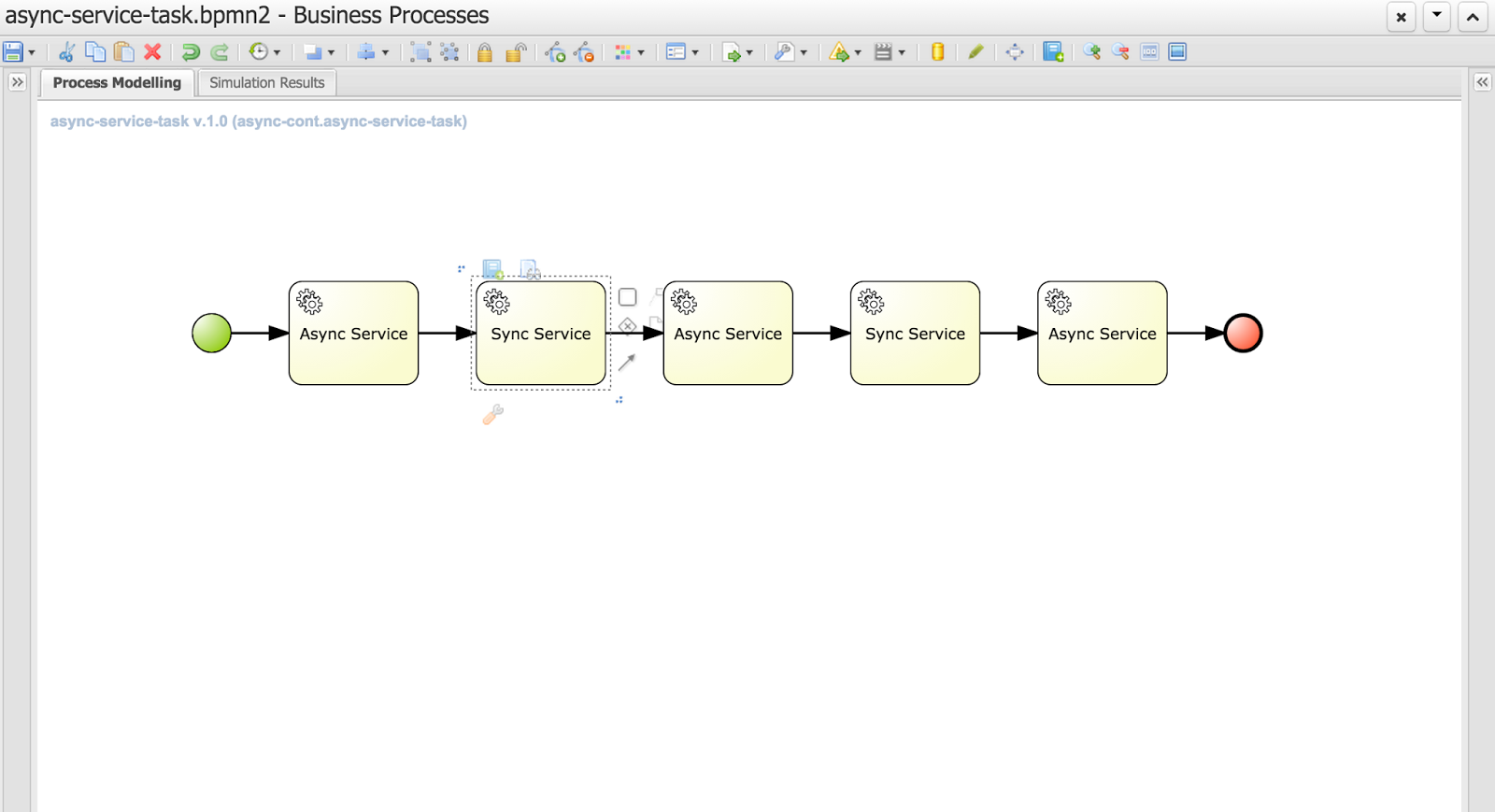
Nevertheless let's take a look at the evolution of that concept to allow users decide themselves what and when should be executed in the background. Let's take a quick look at simple process that is composed of service tasks

You can notice that this process has two types of tasks (look at their names):

  • Async service
  • Sync service
As you can imagine async service will be executed in background while Sync service will be executed on the same thread that its preceding node - so if the preceding node is async node sync node with directly follow it within same thread. 

That's all clear and simple but then how do users define if the service task is async or sync? That's again simple - it's enough to define a dataInput on a task named 'async'
That is the key information to the engine with will inform it how to deal with given node.
Above is the configuration of an Async Service with defined 'async' data input. Next image shows the same configuration but for Sync Service
There is no 'async' dataInput defined.

Here is where I would like to ask for feedback if that way of defining async behavior of a node is sufficient? There is no general BPMN2 property for that behavior and extending BPMN2 xml with custom tags/attributes is not too good in my opinion. 
We could simplify that on editor level where user could simply use checkbox which would define dataInput for the user. All comments are welcome :)

So what will happen if we run this process?


// first async service followed directly by sync service (same thread id)
16:42:26,973 INFO (EJB default - 7) EJB default - 7 Service invoked with name john
16:42:26,977 INFO (EJB default - 7) EJB default - 7 Service invoked with name john

// first async service followed directly by sync service (same thread id)
16:42:29,958 INFO (EJB default - 9) EJB default - 9 Service invoked with name john
16:42:29,962 INFO (EJB default - 9) EJB default - 9 Service invoked with name john

// last async service
16:42:32,954 INFO (EJB default - 1) EJB default - 1 Service invoked with name john


If you look at the timestamps you will see that they match the default settings of jBPM executor - one async thread running every 3 seconds. These are of course configurable so you can fine tune it according to your requirements.

Each process instance of this process will be divided into three steps
Even though Service Tasks are synchronous by nature in BPMN2 with just single setting we can make them execute in background without any coding. 

Moreover, those of you who are already familiar with how jBPM works internally might noticed that these blue boxes actually represents transaction boundaries as well (well, not entirely as start and end node are part of transaction too). So with this we explored another advantage of this feature - possibility to easily define transaction scopes - meaning what nodes should be executed in single transaction. I believe that is another very important feature requested by many jBPM users.

Last but not least bit of technical details. This feature is backed by jBPM executor which is the backbone of asynchronous processing in jBPM 6. That means you need to have executor configured and running to be able to take advantage of this feature. 
If you run on jBPM console (aka kie workbench) there is no need to do anything, you're already fully equipped to do async continuation for all your process.
When you use jBPM in embedded mode there will be some additional steps required that depends on how you utilize jBPM API.
  1. Direct use of KIE API (KieBase and KieSession) - here you need to configure ExecutorService and add it to kieSession environment under "ExecutorService" key. Once it's there it will process the nodes async way
  2. RuntimeManager API - similar to KIE API though you should add ExecutorService as one of environment entires when setting up RuntimeEnvironment
  3. jBPM services API - you need to add ExecutorService as attribute of DepoymentService, if you use CDI or EJB that will be injected automatically for you (assuming all dependencies are available to the container)
This feature is available for:
  • all task types (service, send, receive, business rule, script, user task)
  • subprocesses (embedded and reusable)
  • multi instance task and subprocess

But what happens if user mark node as async but there is no ExecutorService available? Process will still run but will report warning in the log and proceed with nodes as synchronous execution. So it's safe to model your process definition in async way even if there is no async behavior available (yet)

Eclipse use

For those using eclipse modeler instead of web designer: In the new BPMN2 editor (1.2.2), there is a new element under general tab for all tasks, called Metadata. All that needs to be done is add an entry named customAsync and value = true. This will mark the task as asynchronous.

Hope you will like this feature and don't hesitate to leave some comments with feedback and ideas! 

P.S.
This feature is currently on jBPM master and scheduled to go out with 6.3, so if you would like to try it take the latest nightly build or build jBPM from source.

More to come with jBPM so stay tuned...