2015/04/24

Asynchronous continuation in jBPM 6.3

It's been a while since release of 6.2.0.Final but jBPM is not staying idle, quite the opposite lots of changes are coming in. To give a quick heads up on a feature that has been requested many times - asynchronous continuation.

So what is that? Asynchronous continuation is all about allowing process designers to decide what activities should be executed asynchronously without any additional work required. Some might have already be familiar with async work item handlers that require commands to be given that will be carrying the actual work. While this is very powerful feature it requires additional coding - wrapping business logic in a command. Another drawback is flexibility - one could not easily change if work shall be executed synchronously on asynchronously.

Nevertheless let's take a look at the evolution of that concept to allow users decide themselves what and when should be executed in the background. Let's take a quick look at simple process that is composed of service tasks
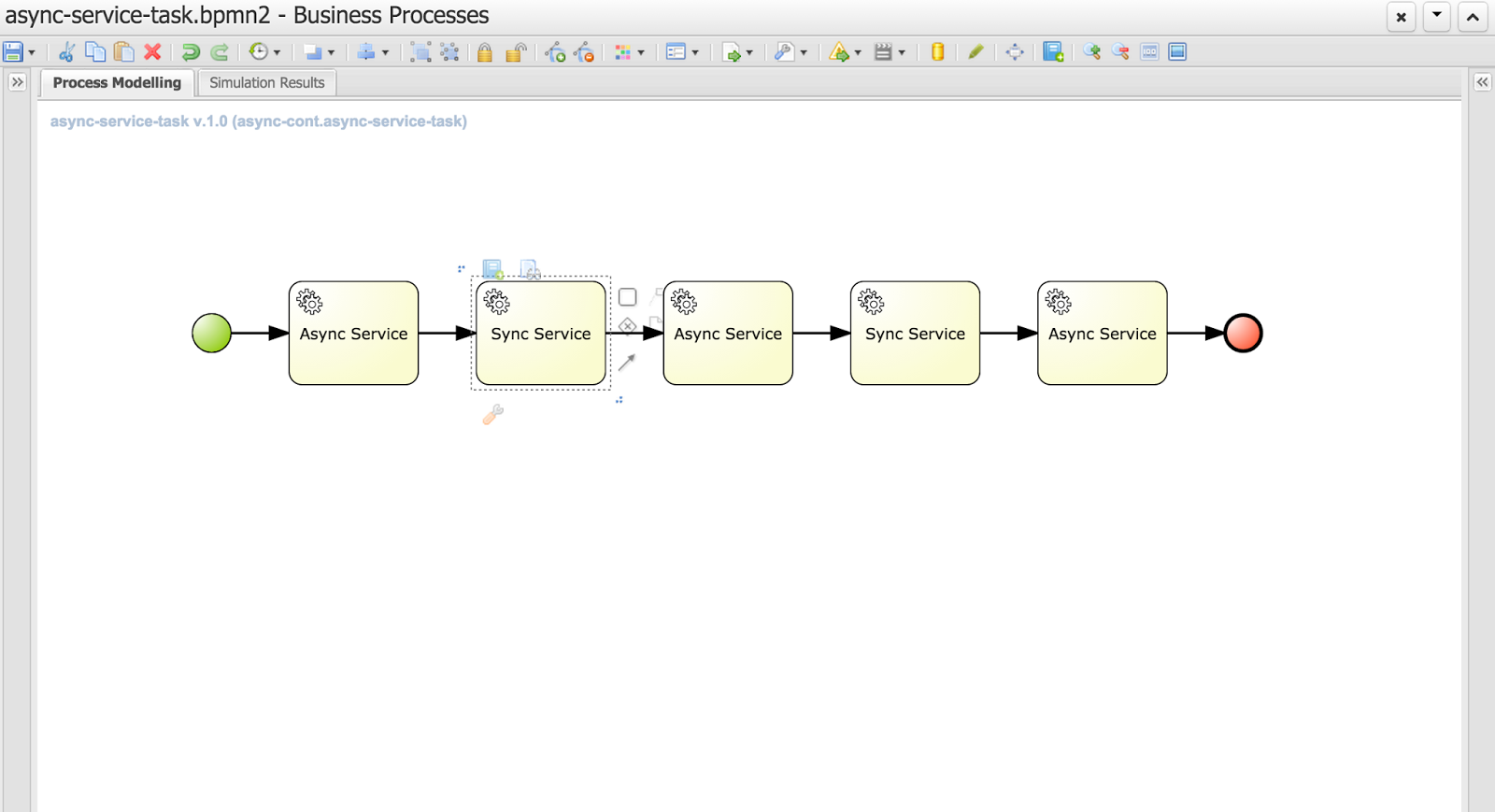
You can notice that this process has two types of tasks (look at their names):

  • Async service
  • Sync service
As you can imagine async service will be executed in background while Sync service will be executed on the same thread that its preceding node - so if the preceding node is async node sync node with directly follow it within same thread. 

That's all clear and simple but then how do users define if the service task is async or sync? That's again simple - it's enough to define a dataInput on a task named 'async'
That is the key information to the engine with will inform it how to deal with given node.
Above is the configuration of an Async Service with defined 'async' data input. Next image shows the same configuration but for Sync Service
There is no 'async' dataInput defined.

Here is where I would like to ask for feedback if that way of defining async behavior of a node is sufficient? There is no general BPMN2 property for that behavior and extending BPMN2 xml with custom tags/attributes is not too good in my opinion. 
We could simplify that on editor level where user could simply use checkbox which would define dataInput for the user. All comments are welcome :)

So what will happen if we run this process?


// first async service followed directly by sync service (same thread id)
16:42:26,973 INFO (EJB default - 7) EJB default - 7 Service invoked with name john
16:42:26,977 INFO (EJB default - 7) EJB default - 7 Service invoked with name john

// first async service followed directly by sync service (same thread id)
16:42:29,958 INFO (EJB default - 9) EJB default - 9 Service invoked with name john
16:42:29,962 INFO (EJB default - 9) EJB default - 9 Service invoked with name john

// last async service
16:42:32,954 INFO (EJB default - 1) EJB default - 1 Service invoked with name john


If you look at the timestamps you will see that they match the default settings of jBPM executor - one async thread running every 3 seconds. These are of course configurable so you can fine tune it according to your requirements.

Each process instance of this process will be divided into three steps
Even though Service Tasks are synchronous by nature in BPMN2 with just single setting we can make them execute in background without any coding. 

Moreover, those of you who are already familiar with how jBPM works internally might noticed that these blue boxes actually represents transaction boundaries as well (well, not entirely as start and end node are part of transaction too). So with this we explored another advantage of this feature - possibility to easily define transaction scopes - meaning what nodes should be executed in single transaction. I believe that is another very important feature requested by many jBPM users.

Last but not least bit of technical details. This feature is backed by jBPM executor which is the backbone of asynchronous processing in jBPM 6. That means you need to have executor configured and running to be able to take advantage of this feature. 
If you run on jBPM console (aka kie workbench) there is no need to do anything, you're already fully equipped to do async continuation for all your process.
When you use jBPM in embedded mode there will be some additional steps required that depends on how you utilize jBPM API.
  1. Direct use of KIE API (KieBase and KieSession) - here you need to configure ExecutorService and add it to kieSession environment under "ExecutorService" key. Once it's there it will process the nodes async way
  2. RuntimeManager API - similar to KIE API though you should add ExecutorService as one of environment entires when setting up RuntimeEnvironment
  3. jBPM services API - you need to add ExecutorService as attribute of DepoymentService, if you use CDI or EJB that will be injected automatically for you (assuming all dependencies are available to the container)
This feature is available for:
  • all task types (service, send, receive, business rule, script, user task)
  • subprocesses (embedded and reusable)
  • multi instance task and subprocess

But what happens if user mark node as async but there is no ExecutorService available? Process will still run but will report warning in the log and proceed with nodes as synchronous execution. So it's safe to model your process definition in async way even if there is no async behavior available (yet)

Eclipse use

For those using eclipse modeler instead of web designer: In the new BPMN2 editor (1.2.2), there is a new element under general tab for all tasks, called Metadata. All that needs to be done is add an entry named customAsync and value = true. This will mark the task as asynchronous.

Hope you will like this feature and don't hesitate to leave some comments with feedback and ideas! 

P.S.
This feature is currently on jBPM master and scheduled to go out with 6.3, so if you would like to try it take the latest nightly build or build jBPM from source.

More to come with jBPM so stay tuned...

2015/03/09

jBPM 6.2.0.Final released!

Last Friday (06.03.2015) jBPM 6.2.0.Final has been released.

It comes with large number of bug fixes and quite a list of new features, to name just few:

  • improved services layer that support various framework add ons
    • CDI
    • EJB
    • Spring
  • jbpm executor improvements and fixes to allow it to run time based reoccurring jobs and be executed in Spring environment
  • improved usability and stability of the KIE workbench application
  • Container support
    • JBoss EAP
    • Wildfly
    • Tomcat
    • WebSphere
    • Weblogic
  • and more that you can find here.
For bug fixes see change log (look at all versions that starts with 6.2.0...).

Let's get started with latest and greatest! ... in three steps


Step 1: Download

First you need to download it:

Step 2: Read and learn

Learn more about jBPM and it's various components by following latest version of documentation

Step 3: Try it

the best way to start is to follow jBPM installer chapter in documentation, but if you're already running jBPM 6.1 you can take a look at this article that provides you with some useful hints on installation and upgrade procedure.

Not only jBPM

At the same time Drools and Optaplanner 6.2.0.Final has been released as well. Checkout their web pages to learn more.

2015/03/06

jBPM 6.2 installation and upgrade from previous version

jBPM 6.2 is almost out the door so it's time to give a quick heads up on how to install and upgrade if you already have previous version of jBPM running.

Installation with jBPM installer

the easiest and best way to install jBPM is using jBPM installer that is described in jBPM documentation. It's simple and automated installation process that:
  • downloads all required components
  • configures services (data source, folder structure, etc)
  • bundles the application 
  • deploys all applications (jbpm console aka kie workbench and dash builder for BAM)
All is done with ant script so it can be modified in case additional requirements pops up. Most of the information users could be interested in is stored in build.properties file which defines
  • version numbers of components to download, 
  • container to be used
  • data base to be used
So if you're going to try jBPM for the first time, I would recommend to go with this approach.

Installation on Wildfly 8.1.0.Final application server

Another approach would be to configure parts of the application and application server manually on clean or already existing Wildfly server. Following are the steps required:
  1. Create data source for jbpm to use - if you want to use default in memory data base that comes with Wildfly server you can skip this step - data source is already defined
    1. Create JBoss module for your JDBC driver e.g. org/postgres
    2. Edit WILDFLY_HOME/standalone/configuration/standalone-full.xml
    3. Define data source for the driver you created e.g. postgres
    4. <xa-datasource jndi-name="java:jboss/datasources/jbpmDS" pool-name="postgresDS" enabled="true" use-java-context="true">
         <xa-datasource-property name="ServerName">
            localhost
         </xa-datasource-property>
         <xa-datasource-property name="PortNumber">
           5432
         </xa-datasource-property>
         <xa-datasource-property name="DatabaseName">
            jbpm
         </xa-datasource-property>
         <driver>postgres</driver>
         <security>
           <user-name>jbpm</user-name>
           <password>jbpm</password>
         </security>
      </xa-datasource>
      
  2. Add application users that will be given access to kie workbench
    1. Use WILDFLY_HOME/bin/add_user.sh script (or add_user.bat for windows) to add user(s)
      1. Use application realm
      2. make sure to assign users one or more of following roles: admin,analyst,user,developer,manager
      3. Additionally you can assign your user to any other roles that will be used for human task assignments e.g HR,PM,IT,Accounting for HR example process
      4. If you would like to use asset management feature that comes with 6.2 assign your user another role called: kiemgmt
  3. Download wildfly distribution of the kie workbench for version 6.2.0.Final from here.
  4. Extract the war file into WILDFLY_HOME/standalone/deployments/jbpm-console.war
    1. You should have all files from the war file inside jbpm-console.war
  5. Configure persistence for jbpm console
    1. Edit WILDFLY_HOME/standalone/deployments/jbpm-console.war/WEB-INF/classes/META-INF/persistence.xml file
    2. Change JNDI name for the data source
    3. Change the hibernate dialect for data base you use
  6. Create jbpm-console.war.dodeploy empty file inside WILDFLY_HOME/standalone/deployments directory
That's all, now you're ready to start your application server with jbpm console (kie workbench) deployed. To do that go into WILDFLY_HOME/bin and issue following command:
./standalone.sh --server-config=standalone-full.xml

or for windows
./standalone.bat --server-config=standalone-full.xml

NOTE: If you don't have internet access or you don't want to load example repositories from github add following parameter into the server startup command: -Dorg.kie.demo=false

./standalone.sh --server-config=standalone-full.xml -Dorg.kie.demo=false

or for windows
./standalone.bat --server-config=standalone-full.xml -Dorg.kie.demo=false

Upgrade jBPM from 6.1 to 6.2

Upgrading of already existing installation of jBPM console (kie-workbench) that runs with version 6.1 (though from 6.0.1 should be pretty much the same though I haven't tested myself) is quite simple, but requires some steps to be manually executed.

There are some data base changes that must be applied to successfully upgrade workbench to version 6.2 and do not loose any context - like missing deployments, nor not being able to see process or task instances. 

So let's upgrade existing 6.1 environment
  1. Shutdown your existing server(s) that run jBPM 6.1 - if there are any running instances
  2. Perform data base upgrade
    1. jBPM 6.2. comes with upgrade script for commonly used data bases, it can be found as part of jbpm installer/db/upgrade-scripts package or can be taken from gihub.
    2. This script contains all data bases so please take only section that applies to your data base (below sql script for postgesql data base as an example)
    3. ALTER TABLE sessioninfo ALTER COLUMN id TYPE bigint;
      ALTER TABLE AuditTaskImpl ALTER COLUMN processSessionId TYPE bigint;
      ALTER TABLE ContextMappingInfo ALTER COLUMN KSESSION_ID TYPE bigint;
      ALTER TABLE Task ALTER COLUMN processSessionId TYPE bigint;
      
      create table DeploymentStore (
          id int8 not null,
          attributes varchar(255),
          DEPLOYMENT_ID varchar(255),
          deploymentUnit text,
          state int4,
          updateDate timestamp,
          primary key (id)
      );
      
      alter table DeploymentStore add constraint UK_DeploymentStore_1 unique (DEPLOYMENT_ID);
      create sequence DEPLOY_STORE_ID_SEQ;
      
      ALTER TABLE ProcessInstanceLog ADD COLUMN processInstanceDescription varchar(255);
      ALTER TABLE RequestInfo ADD COLUMN owner varchar(255);
      ALTER TABLE Task ADD COLUMN description varchar(255);
      ALTER TABLE Task ADD COLUMN name varchar(255);
      ALTER TABLE Task ADD COLUMN subject varchar(255);
      
      -- update all tasks with its name, subject and description
      update task t set name = (select shorttext from I18NText where task_names_id = t.id);
      update task t set subject = (select shorttext from I18NText where task_subjects_id = t.id);
      update task t set description = (select shorttext from I18NText where task_descriptions_id = t.id);
      
      INSERT INTO AuditTaskImpl (activationTime, actualOwner, createdBy, createdOn, deploymentId, description, dueDate, name, parentId, priority, processId, processInstanceId, processSessionId, status, taskId)
      SELECT activationTime, actualOwner_id, createdBy_id, createdOn, deploymentId, description, expirationTime, name, parentId, priority,processId, processInstanceId, processSessionId, status, id 
      FROM Task;
      
    4. Execute these scripts on your data base - NOTE: make sure that you execute these scripts as schema owner to avoid any permission violation issues one startup
  3. Remove jbpm console war file from your application server deployments folder WILDFLY_HOME/standalone/deployments
  4. Download wildfly distribution of the kie workbench for version 6.2.0.Final from here.
  5. Extract the war file into WILDFLY_HOME/standalone/deployments/jbpm-console.war
    1. You should have all files from the war file inside jbpm-console.war
  6. Configure persistence for jbpm console
    1. Edit WILDFLY_HOME/standalone/deployments/jbpm-console.war/WEB-INF/classes/META-INF/persistence.xmfile
    2. Change JNDI name for the data source
    3. Change the hibernate dialect for data base you use
  7. Create jbpm-console.war.dodeploy empty file inside WILDFLY_HOME/standalone/deployments directory - if not already there
That's pretty much all steps that are needed, but before you start the server let me provide you with some changes that are worth noting for 6.2 version that might impact the way it was used.
  • in 6.1 all deployment units that were active on the server were stored in system.git repository - which made it workbench specific and quite hidden - 6.2 comes with db based store for information about active deployments. With that, by default storage of deployment unit info are no more persisted into system.git. Though it can be enabled to be still stored in there by using system property: -Dorg.kie.git.deployments.enabled=true
  • in 6.1 all operations of Build & Deploy issued from Project Editor caused auto deploy to runtime which was not always desired, this can be disabled using system property: -Dorg.kie.auto.deploy.enabled=false
  • in 6.1 redeploy of same version (regardless if that was concrete version or snapshot) was by default allowed, in 6.2 concrete versions must be explicitly undeployed before they can be redeployed. This can be overridden by system property which will allow redeploy for all versions: -Dorg.kie.override.deploy.enabled=true
Now you can start your server and enjoy enhancements and bug fixes that jBPM 6.2 brings in.
 To do that go into WILDFLY_HOME/bin and issue following command:
./standalone.sh --server-config=standalone-full.xml

or for windows
./standalone.bat --server-config=standalone-full.xml

Hope it will be useful and as usually comments are more than welcome.

2015/01/23

MultiInstance Characteristic example - Reward Process

One of a great features of BPMN (and not only) is the multi instance activity aka for each. To put it simple same activity is repeated for each item from input collection. That is usually good fit for distributing work across number of people to gather their input or opinion.
jBPM provides support for it since version 5 but it was enhanced with every version. Current support covers:

  • subprocess and individual task
  • input and output as collection
  • completion condition on entire multi instance activity (subprocess or task)

Equipped with that we can build powerful processes with simplified structure. Even more than that: it's all dynamic meaning number of instances can (and actually should as best practice) reference process variables for both input and output.

To show it in practice we go over an example that is based on Eric Shabell's Reward demo. It has been only slightly modified to focus mainly on the multi instance support jBPM comes with in version 6.2 community. 

So what we have in this process?
  1. When process start it will ask for some details about the person who shall receive award and its details
  2. Once instance is started it will go into 'Associate Reviews' user task where associate needs to provide following information:
    1. how many peer reviews should be performed
    2. how many of them are required to move on without waiting for all to be completed
  3. Once this information is available 'Setup Reviews' task will prepare all required structures and populate process variables that will feed multi instance subprocess
  4. 'Evaluate Award' task will be created multiple times based on (2.1) selection
  5. Each instance of that user task will ask for approval and result of it will be kept in multi instance output collection
  6. It has a completion condition that will evaluate result every time one instance of 'Evaluate Award' task is completed as soon as it becomes true it will move on and cancel remaining task instances of 'Evaluate Award'
  7. 'Calculate results' will be performed to check what output is collected - if award is approved or rejected and based on that will go to one of the paths.
So let's review process configuration in details, starting with process variables


This in general is nothing special, just worth noting two variables:
  • reviews_collection
  • reviews_results
both are of type java.util.ArrayList (they can be of any collection type) and they will be used for configuring multi instance subprocess. Important to note is that both must be non null before they can be used in multi instance activity.

Next let's review how the multi instance activity is configured:

MI collection input - this is the collection which will be used to create individual instances of given activity. In other words, each element from that collection will be assigned to separate activity instance.
MI collection output - this is the collection which will collect results of execution of multi instance activity - will aggregate all results produced. This is optional as not every multi instance activity must produce result that shall be collected.
MI completion condition - expression (currently MVEL) that will be evaluated at every completion of activity instance and as soon as it becomes true it will leave multi instance activity even if not all instances are completed. Those not completed will be canceled.
MI data input - this is the variable name that will be given to individual activity instances produced by multi instance activity. 
MI data output - this is the variable name where the output of individual activity instance will be stored. It's optional as not all activities must produce results


Last but not least let's take a look in details at the completion condition as it provide quite powerful way of controlling multi instance activity completion.

In case it won't be readable (or for copy paste reason) here is the expression:

($ in reviews_results if $ == true).size() == approvalsRequired;

so what does it say? In general it evaluates all items in the 'reviews_results' collection and counts all elements that has value set to 'true'. Next it compares its size with the 'approvalsRequired' process variable to check if already collected approvals is enough.

For those interested, this is MVEL projections example which gives very powerful option to operate on collections.

That would be all to this article. For complete runnable example visit github. You can directly clone it from your kie-workbench installation (aka jbpm console) and run it there. It comes with all required parts:
  • process
  • forms
  • data model
All configured and ready to be executed (just make sure you run on jBPM 6.2 or higher). Enjoy

As usual comments and feedback most welcome.

2015/01/07

jBPM talk and workshop at DevConf 2015

I am happy to announce that a talk and workshop about jBPM 6 has been accepted at DevConf 2015 in Brno.

Talk: jBPM - BPM Swiss knife

During the presentation jBPM will be introduced from the Process Engine & framework perspective.The main goal of the session is to share with the community of developers how they can improve their systems implementations and integrations by using a high level, business oriented methodology that will help to improve the performance of the company. jBPM will help to keep the infrastructural code organized and decoupled from the business knowledge. During the presentation the new APIs and new modules in jBPM version 6 will be introduced for the audience to have a clear spectrum of the tools provided.

Speaker: Maciej Swiderski

Workshop: Get your hands dirty with jBPM 

This is continuation of the presentation of jBPM (jBPM - BPM swiss knife) that introduces to jBPM while this is mainly focused on making use of that knowledge in real cases. On this workshop users will be able to see in action jBPM from both perspectives:
  • as a services when jBPM is used as BPM platform
  • as embedded when jBPM is used as a framework in custom applications
This workshop is intended to give a quick start with jBPM and help users to decide which approach is most suitable for their needs.

Speakers:
Jiri Svitak
Maciej Swiderski
Radovan Synek

Schedule for the complete conference can be found here. See you there!!!

2014/12/16

Keep your jBPM environment healthy

Once jBPM is deployed to given environment and is up and running most of actual maintenance requirements come into the picture. Running BPM deployment will have different maintenance life cycle depending on the personas involved:

  • business users would need to make sure latest versions of processes are in use
  • administrators would need to make sure that entire infrastructure is healthy 
  • developers would need to make sure all projects are available to their systems

In this article I'd like to focus on administrators to give them a bit of power to maintain jBPM environments in a easier way. So let's first look at what sort of thing they can be interested with....

jBPM when configured to use persistence will store its state into data base over JPA. That is regardless if jbpm-console/kie-wb is used or jBPM runs in embedded mode. Persistence can be divided into two sections:
  • runtime data - current state of active instances (processes, tasks, jobs)
  • audit data - complete view of all states of instances (processes, tasks, events, variables)
Above diagram presents only subset of data model for jBPM and aims at illustrating important parts from maintenance point of view.

Important information here is that "runtime data" is cleaned up automatically on life cycle events:
  • process instance information will be removed upon process instance completion
  • work item information will be removed upon work item completion
  • task instance information (including content) will be removed upon completion of a process instance that given tasks belongs to
  • session information clean up depends on the runtime strategy selected
    • singleton - won't be removed at all
    • per request will be removed as soon as given request ends
    • per process instance - will be removed when process instance mapped to given session completes (or aborts)
  • executor's request and error information is not removed
So far so good, we have cleanup procedure in place but at the same time we loose all trace of process instances being executed at all. In most of the case this is not an acceptable solution...

And because of that there are audit data tables available (and used by default) to keep trace of what has been done, moreover it does keep track of what is happening in the environment as well. So it is actually great source of information in any given point in time. Thus name audit data might be slightly misleading ... but don't worry it is the first class citizen and is actually used by jbpm services  to provide you with all the details about current view on past and present.

So that puts us in tight spot - that data is gathered in audit tables but we do not have control over how long would that be stored in these tables. In environments that do operate on large number of process instances and task instances this might be seen as a problem. To help with this maintenance burden a clean up procedure has been provided (from version 6.2) that will allow two approaches to the topic:
  • automatic clean up as scheduled job running in background on defined intervals
  • manual clean up by taking advantage of the audit API

LogCleanupCommand

LogCleanupCommand is jbpm executor command that consists of logic to clean up all (or selected) audit data automatically. That logic is simply taking advantage of audit API to clean it up but provides one significant benefit - it can be scheduled and executed repeatedly by using reoccurring jobs feature of jbpm executor. Essentially this means that once job completes it provides information to the jbpm executor if and when next instance of this job should be executed. By default LogCleanupCommand is executed one a day from the time it was scheduled for the first time. It of course can be configured to run on different intervals.

NOTE: LogCleanupCommand is not registered to be executed out of the box to do not remove data without explicit request so it needs to be started as new job, see short screen cast on how to do it.

LogCleanupCommand comes with several configuration options that can be used to tune the clean up procedure.


NameDescriptionIs exclusive
SkipProcessLogIndicates if clean up of process instance, node instance and variables log cleanup should be omitted (default false)No, can be used with other parameters
SkipTaskLogIndicates if task audit and task event logs cleanup should be omitted (default false)No, can be used with other parameters
SkipExecutorLogIndicates if jbpm executor entries cleanup should be omitted (default false)No, can be used with other parameters
SingleRunIndicates if the job should run only once default falseNo, can be used with other parameters
NextRunDate for next run in time expression e.g. 12h for jobs to be executed every 12 hours, if not given next job will run in 24 hours from time current job completesNo, can be used with other parameters
OlderThanDate that logs older than should be removed - date format YYYY-MM-DD, usually used for single run jobsYes, cannot be used when OlderThanPeriod is used
OlderThanPeriodTimer expression that logs older than should be removed - e.g. 30d to remove logs older than 30 day from current timeYes, cannot be used when OlderThan is used
ForProcessProcess definition id that logs should be removed forNo, can be used with other parameters
ForDeploymentDeployment id that logs should be removed forNo, can be used with other parameters
EmfNamePersistence unit name that shall be used to perform delete operationsN/A

Another important aspect of the LogCleanupCommand is that it protects the data it removes by making sure it won't delete active instances such as still running process instances, task instance or executor jobs.

NOTE: Even though there are several options to use to control what data shall be removed, recommended is to always use date as all audit data tables do have timestamp while some do not have other parameters (process id or deployment id).


A short screencast shows how LogCleanupCommand can be used in practice. It shows to scenarios (two execution of a command) where both are just single run:

  • first that attempts to remove everything that is older than 1 day
  • second that removes everything that is older than current time - not parameter for date is given
For the first run we only see that one job has been removed as only that met the criteria to be older than 1 day and all other was started same day. Then the second run that removes everything that was completed did actually removed them as expected.

Manual cleanup via audit API

Instead of having automatic cleanup of jobs, administrators can make use of audit API to do the clean up manually with more control over parameters to control what is to be removed. Audit API is divided in three areas (same as shown on the diagram) that covers different parts of the environment:
  • process audit to clean up process, node and variables logs via jbpm-audit module
  • task audit to clean up tasks and task events via jbpm-human-task-audit module
  • executor jobs to cleanup jbpm executor jobs and errors via jbpm-executor module
API cleanup support is done in hierarchical way so in case all needs to be cleaned up it's enough to take the last audit service from hierarchy and all operations will be available.
  • org.jbpm.process.audit.JPAAuditLogService
  • org.jbpm.services.task.audit.service.TaskJPAAuditService
  • org.jbpm.executor.impl.jpa.ExecutorJPAAuditService
Example 1 - remove completed process instance logs
JPAAuditLogService auditService = new JPAAuditLogService(emf);
ProcessInstanceLogDeleteBuilder updateBuilder = auditService.processInstanceLogDelete().status(ProcessInstance.STATE_COMPLETED);
int result = updateBuilder.build().execute();

Example 2 - remove task audit logs for deployment org.jbpm:HR:1.0
TaskJPAAuditService auditService = new TaskJPAAuditService(emf);
AuditTaskInstanceLogDeleteBuilder updateBuilder = auditService.auditTaskInstanceLogDelete().deploymentId("org.jbpm:HR:1.0");
int result = updateBuilder.build().execute();

Example 3 - remove executor error and requests
ExecutorJPAAuditService auditService = new ExecutorJPAAuditService(emf);
ErrorInfoLogDeleteBuilder updateBuilder = auditService.errorInfoLogDeleteBuilder().dateRangeEnd(new Date());
int result = updateBuilder.build().execute();

RequestInfoLogDeleteBuilder updateBuilder = auditService.requestInfoLogDeleteBuilder().dateRangeEnd(new Date());
result = updateBuilder.build().execute();

NOTE: when removing jbpm executor entries make sure first error info is removed before request info can be removed due to constraints setup on data base.

See API for various options on how to configure cleanup operations:

Equipped with these features jBPM environment can be kept clean and healthy for long long time without much effort.

Ending always same way - feedback is more than welcome.

2014/11/28

Process instance migration made easy

jBPM 6 comes with an excellent deployment model based on knowledge archives which allows different versions of given project to run in parallel in single execution environment. That is very powerful but at the same time brings some concerns about how to deal with them, to name few:

  • shall users run both old and new version of the processes?
  • what shall happen to already active process instances started with previous version?
  • can active versions be migrated to newer version and vice versa?

While there might be other concerns, one of the most frequently asked question is such situation is: can I migrate active process instance?

So can we do process migration with jBPM?

The straight answer is - YES

... but it was not easily available to be performed via jbpm console (aka kie-workbench). This article is about to introduce solution to this limitation by providing ... knowledge archive that can be deployed to your installation and simply used to migrate any process instance. I explicitly use term "migrate" instead of upgrade because it can actually be used in both directions (from lower to higher version or from higher to lower version).

So there are quite few things that might happen when such operation is performed. All depends on the changes between versions of the process definition that are part of the migration. So what does this process migration comes with:

  • it can migrate from one process to another within same kjar
  • it can migrate from on process to another across kjars
  • it can migrate with node mapping between process versions 

While the first two options are simple, the third one might require some explanation. What is node mapping? While doing changes in process versions we might end up in situation that nodes/activities are replaced with another node/activity and by that when migrating between these versions mapping needs to take place. Another aspect is when you would like to skip some nodes in current version (see second example).

NOTE: mapping will happen only for active nodes of the process instance that is being migrated.

Be careful what you migrate...

Migration does not affect any data so please take that into account when performing migration as in case there were changes on data level process instance migration will not be able to resolve potential conflicts and that might lead to problems after migration.

To give you some heads up about how does it work, here comes two screencasts that showcase its capabilities in actions. For this purpose we use our standard Evaluation process that is upgraded with new version and active process instance is migrated to next version.

Simple migration of process instance

This case is about showing how simple it can be to migrate active process instance from one version to another:
  • default org.jbpm:Evaluation:1.0 project is used which consists of single process definition - evaluation with version 1
  • single process instance is started with this version
  • after it has been started, new version of evaluation process is created
  • upgraded version is then released as part of org.jbpm:Evaluation:2.0 project with process version 2
  • then migration of the active process instance is performed
  • results of the process instance migration is the illustrated on process model of active instance and as outcome of the process instance migration

Process instance migration with node mapping

In this case, we go one step further and add another node to Evaluation process (version 2) to skip one of the nodes from original version. So to do that, we need to map nodes to be migrated. Steps here are almost the same as in first case with the difference that we need to go over additional steps to collect node information and then take manual decision (over user task) what nodes are mapped to new version. Same feedback is given about results.


Ready to give it a go?

To play with it, make sure you have jBPM version 6.2 (currently available at CR level from maven repository but soon final release will be available) and then grab this repository into your jbpm console (kie-wb) workspace - just clone it directly in kie-wb. Once it's cloned simply build and deploy and you're ready to migrate any process instance :).

Feedback, issues, ideas for improvements and last but not least contribution is more than welcome.